lets talk about cdn
#Table of Contents
- breif
- Where Did It Begin?
- What Exactly Is a CDN?
- Origin Server
- Edge Server
- Point of Presence
- How Does a CDN Work?
- 1. You Request a Website
- 2. DNS Helps Route Your Request
- 3. Your Request Reaches an Edge Server
- Caching: The Core of a CDN
- Cache Hit vs Cache Miss
- Cache Hit
- Cache Miss
- What Does a CDN Actually Cache?
- Images
- Stylesheets
- JavaScript
- Fonts
- Videos
- Documents
- How Long Does Content Stay Cached?
- How Does the CDN Choose an Edge Server?
- Why Are CDNs Faster?
- 1. Reduced Physical Distance
- 2. Fewer Expensive Trips to the Origin
- 3. Reduced Origin Load
- 4. Modern Network Protocols
- What About Dynamic Content?
- Static Content
- Dynamic Content
- CDNs and Security
- DDoS Protection
- TLS Termination
- Rate Limiting
- CDN vs Reverse Proxy
- What Happens When a CDN Misses?
- Step 1: DNS
- Step 2: Edge Server
- Step 3: Cache Check
- Step 4: Cache Hit
- Step 5: Cache Miss
- A Real-World Mental Model
- The Bigger Picture
- Conclusion
breif
You might not realize it, but every time you browse the internet, you're probably interacting with a CDN.
You open Instagram, watch a YouTube video, visit an online store, or load a news website. Behind the scenes, a network of servers is working to deliver images, videos, JavaScript, fonts, and other content to your device as quickly as possible.
You probably don't think about where that content is coming from.
And honestly, you shouldn't have to.
A good website simply loads.
But here's the interesting part: the server hosting a website could be thousands of kilometers away from you.
So how does a website load an image, JavaScript file, or video from halfway around the world in just a fraction of a second?
The answer, in many cases, is a CDN, or Content Delivery Network.
And once you understand how a CDN works, the modern web starts to make a lot more sense.
Where Did It Begin?
The idea behind CDNs started with a simple problem:
The internet was getting crowded.
As more people started using the web, websites became more than just a few lines of text. They began serving images, videos, software, documents, and increasingly large amounts of data to users all over the world.
But there was a problem.
Most websites were hosted on a relatively small number of servers.
Imagine a website hosted on a server in the United States.
A user in India requests an image from that website.
The request has to travel from India to the United States. The server processes the request, sends the image back across the internet, and eventually it reaches the user.
For one person, this might be perfectly fine.
But now imagine thousands or millions of people doing the same thing.
The origin server has to handle all those requests, while the same files are repeatedly traveling across long distances.
This creates two major problems:
- Latency increases with physical distance.
- The origin server has to handle a huge number of repeated requests.
The solution was surprisingly simple:
Instead of making everyone travel to the data, bring the data closer to the people.
This idea eventually led to Content Delivery Networks.
A CDN distributes servers across different geographical locations. These servers can store copies of frequently requested content and serve it from a location closer to the user.
The fundamental idea is still the same today:
Put the content closer to the person requesting it.
What Exactly Is a CDN?
A Content Delivery Network is a geographically distributed network of servers designed to deliver content to users with lower latency and better reliability.
Instead of every user communicating directly with the server where a website is hosted, a CDN sits between the user and the website's origin server.
A simplified architecture looks like this:
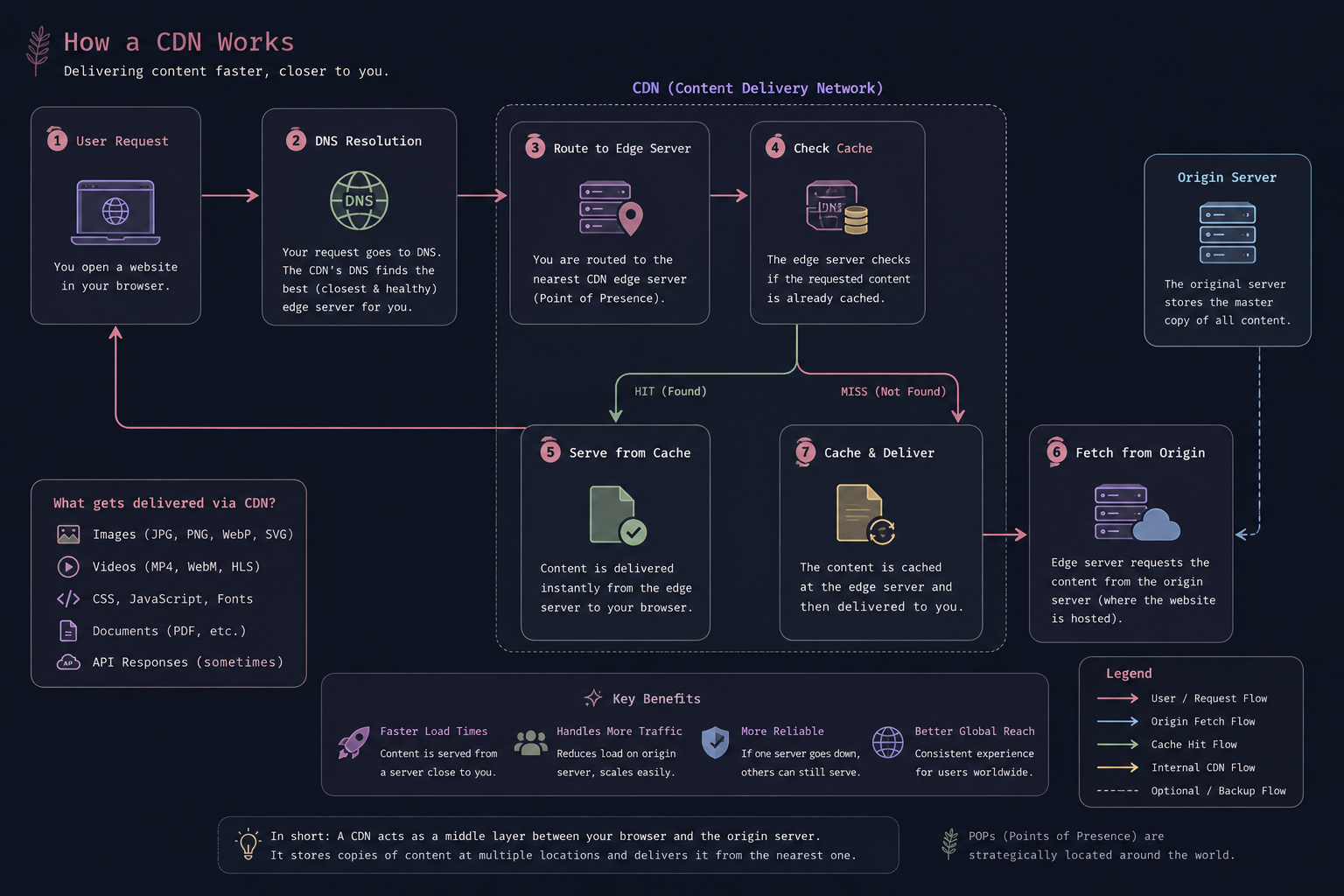 fun fact the above image is also hosted on a cdn
There are a few important terms to understand.
Origin Server
The origin server is the original server where your application's content lives.
It might contain:
- HTML
- Images
- JavaScript
- CSS
- Videos
- API responses
- Other application data
The origin is considered the authoritative source for the content.
Edge Server
An edge server is a CDN server located closer to users.
Instead of every request traveling to the origin, the edge server can respond directly when it already has the requested content.
Point of Presence
CDN infrastructure is organized into locations commonly called Points of Presence, or PoPs.
A PoP is essentially a physical location containing networking and server infrastructure that helps deliver content to users in a particular region.
A large CDN can have PoPs distributed across many cities and countries.
How Does a CDN Work?
Let's follow what happens when you open a website.
1. You Request a Website
You type something like:
https://example.com
into your browser.
Your browser needs to retrieve resources from the website.
That could include:
index.html
style.css
app.js
logo.png
font.woff2
image.webp
Without a CDN, many of these requests could go directly to the origin server.
With a CDN, things work differently.
2. DNS Helps Route Your Request
Before your browser can communicate with the server, it needs to determine where the domain should resolve.
This is where DNS, or the Domain Name System, comes into the picture.
For CDN-backed domains, DNS infrastructure can help direct users toward appropriate CDN infrastructure.
The CDN can consider factors such as:
- Geographic location
- Network conditions
- Server availability
- Latency
- Traffic load
The goal is to get the user to an appropriate edge location.
3. Your Request Reaches an Edge Server
Your request eventually reaches a CDN edge server.
Let's say you're in India.
Instead of sending every request to an origin server in the United States, the CDN may be able to serve your request from an edge location much closer to you.
But there is one important question:
Does that edge server actually have the content?
That's where caching comes in.
Caching: The Core of a CDN
Caching is one of the most important concepts behind CDNs.
A cache stores previously retrieved data so it can be reused later.
Think about a popular image:
logo.png
Suppose one thousand users request the same image.
Without caching:
User 1 ──────► Origin
User 2 ──────► Origin
User 3 ──────► Origin
User 4 ──────► Origin
...
User 1000 ───► Origin
The origin has to repeatedly provide the same file.
With a CDN:
Origin ──────► image.png ──────► [User 1, User 2, User 3, ... User 1000]
The edge server can store the file.
Future users can then receive it directly from the edge.
This is what makes a CDN so powerful.
Cache Hit vs Cache Miss
When an edge server receives a request, it checks its cache.
There are two important possibilities.
Cache Hit
A cache hit happens when the requested content is already stored on the edge server.
For example:
User -> CDN Edge (is image.png cached?) -> [YES] -> User
The CDN can immediately return the cached content.
The origin server doesn't need to be contacted.
This reduces:
- Latency
- Origin traffic
- Bandwidth usage
- Server workload
Cache Miss
A cache miss happens when the requested content isn't available in the edge server's cache.
The request then needs to be fulfilled from the origin.
User -> CDN Edge (is image.png cached?) -> [NO] -> Origin Server -> Stores content in cache -> User
The edge server retrieves the content from the origin.
It can then cache the response according to the CDN's caching rules.
Future requests may now become cache hits.
This creates a simple pattern:
First request -> Cache Miss -> Fetch from origin -> Store in CDN -> Future requests -> Cache Hits
What Does a CDN Actually Cache?
CDNs are particularly useful for content that doesn't change frequently.
Common examples include:
Images
.jpg
.png
.webp
.svg
.avif
Stylesheets
.css
JavaScript
.js
Fonts
.woff
.woff2
.ttf
Videos
Depending on the architecture, CDNs can distribute video segments and streaming content.
Documents
.pdf
.zip
In some architectures, CDNs can also cache API responses and other dynamic data, but this requires much more careful caching rules.
You generally don't want a CDN accidentally serving one user's private data to another user.
How Long Does Content Stay Cached?
A CDN can't simply keep everything forever.
Websites change.
Imagine you update:
logo.png
but users around the world are still receiving the old version from CDN caches.
That's where cache expiration comes in.
One common mechanism is TTL, or Time To Live.
For example:
Cache-Control: max-age=3600
This tells a cache that the response can generally be considered fresh for 3600 seconds, or one hour.
After the content becomes stale, the CDN may need to revalidate or fetch a newer version depending on the caching configuration.
CDNs also provide mechanisms for explicitly purging cached content.
This is why cache invalidation is such an important part of CDN configuration.
How Does the CDN Choose an Edge Server?
You might be wondering:
If a CDN has hundreds or thousands of servers, how does it decide where my request should go?
There isn't always one single mechanism.
CDNs can use combinations of:
- DNS-based routing
- Anycast
- Geographic information
- Network topology
- Latency measurements
- Server health
- Load balancing
The goal isn't necessarily to find the server that is geographically closest.
The geographically closest server isn't always the network-wise fastest or healthiest server.
A CDN is ultimately trying to find an edge location that can serve the request efficiently.
Why Are CDNs Faster?
There isn't a single reason.
Several things work together.
1. Reduced Physical Distance
The speed of light is finite.
Data traveling thousands of kilometers will inherently take longer than data traveling a much shorter distance.
A CDN reduces this distance for cached content.
Without CDN:

User ───────────────────────────────► Origin
      Long geographical distance


With CDN:

User ─────► Edge Server
            Shorter distance
2. Fewer Expensive Trips to the Origin
If content is already cached at an edge server, the origin doesn't need to handle every request.
Instead:
CDN Edge -> [User1, User2, User3, ..., UserN]
One cached copy can serve many users.
3. Reduced Origin Load
Imagine an image being requested one million times.
Without caching:
1,000,000 requests → Origin
With effective caching:
Many requests -> CDN Edge -> Occasional request → Origin
The origin can focus on requests that actually require application processing.
4. Modern Network Protocols
Modern CDNs also take advantage of technologies such as:
- HTTP/2
- HTTP/3
- TLS optimization
- Connection reuse
- Compression
- Efficient routing
These optimizations aren't unique to CDNs, but CDN providers can apply them at globally distributed infrastructure.
What About Dynamic Content?
This is where things become more interesting.
Not everything can be cached.
Consider a request like:
GET /profile
The response might depend on the currently authenticated user.
For example:
User A → /profile → Alice's profile

User B → /profile → Bob's profile
Caching that response carelessly could be disastrous.
This is why we need to distinguish between static and dynamic content.
Static Content
Usually identical for many users:
logo.png
app.js
style.css
font.woff2
This is ideal for caching.
Dynamic Content
Generated based on a request, user, or current state:
/account
/cart
/dashboard
/api/user
This often needs to reach the application server.
However, CDNs can still help dynamic applications.
They can optimize the network path, terminate TLS, handle connections, protect the origin, route requests, and in some architectures execute logic at the edge.
This is one of the reasons modern CDNs have evolved far beyond simply caching images.
CDNs and Security
CDNs aren't only about performance.
They can also act as an important security layer between users and the origin server.
DDoS Protection
A large CDN has infrastructure distributed across many locations.
This allows it to absorb and filter large amounts of unwanted traffic before it reaches the origin.
TLS Termination
CDNs can also handle TLS connections at their edge locations.
This allows users to establish secure connections with infrastructure that is geographically closer to them.
Rate Limiting
CDNs can limit how frequently a client can make requests.
This can help protect applications from abusive traffic and certain types of automated attacks.
CDN vs Reverse Proxy
A CDN is closely related to another networking concept: the reverse proxy.
A reverse proxy sits in front of a server and receives requests on its behalf.
Client -> Reverse Proxy -> Application Server
A CDN often behaves like a geographically distributed reverse proxy.
The major difference is scale and purpose.
A traditional reverse proxy might sit in front of your application in one location.
A CDN can have infrastructure distributed across many locations around the world.
In practice, modern CDN platforms combine several capabilities:
- Reverse Proxy
- Caching
- Load Balancing
- TLS
- DDoS Protection
- WAF
- Traffic Routing
- Edge Computing
What Happens When a CDN Misses?
Let's put everything together with a simple example.
Suppose you visit:
https://cdn.ayushanand.com/cat.png
Here's what can happen.
Step 1: DNS
Your browser resolves the domain and is directed toward appropriate CDN infrastructure.
Step 2: Edge Server
Your request reaches a CDN edge server.
Step 3: Cache Check
The edge server checks:
Do I have cat.png?
Step 4: Cache Hit
If the file exists and is still fresh:
Edge Cache -> Browser
Done.
The origin never needed to send the file.
Step 5: Cache Miss
If the file isn't cached:
Browser -> CDN Edge -> Origin Server
The origin returns the file. The CDN can then store it.
The next user requesting the same file may get
Browser -> CDN Edge -> cat.png
No trip to the origin is necessary.
A Real-World Mental Model
Think of the origin server as a warehouse.
The warehouse contains everything.
But you don't want every customer in the country traveling to that warehouse whenever they need something.
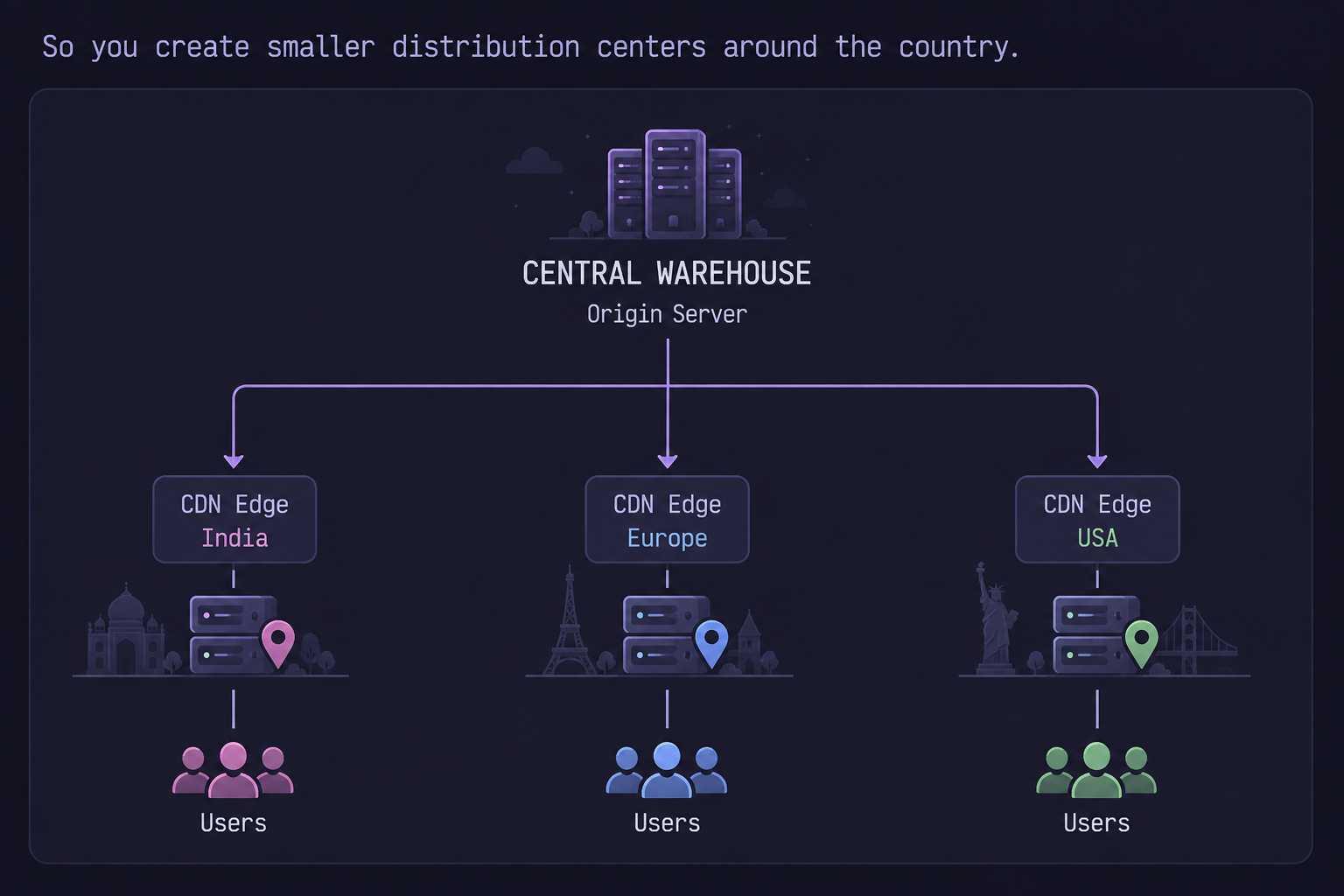
If an edge server already has what the customer wants, it can provide it immediately.
If it doesn't, it gets the item from the warehouse and can keep a copy for the next customer.
That's essentially the idea behind a CDN.
The Bigger Picture
The interesting thing about CDNs is that the basic idea is incredibly simple:
Move frequently requested data closer to the people requesting it.
But implementing that idea at internet scale is anything but simple.
A modern CDN has to deal with:
- Millions of users
- Huge amounts of traffic
- Global routing
- Cache consistency
- Network failures
- Security attacks
- TLS connections
- Load balancing
- Different network conditions
- Dynamic applications
What started as a solution to reduce the distance between users and content has evolved into a major part of the infrastructure powering the modern internet.
And you probably interact with it every single day without ever seeing it.
Conclusion
The next time a website loads almost instantly, think about what might be happening behind the scenes.
Your request may have traveled through DNS infrastructure, reached a nearby CDN edge server, hit a cache, and returned the requested content without ever touching the server where the website actually lives.
That's the fundamental trick behind a CDN.
Don't make everyone travel to the data. Bring the data closer to everyone.
Once you understand that idea, concepts like edge servers, caching, PoPs, reverse proxies, and global traffic routing become much easier to understand.
And that's one of the reasons CDNs are such an important piece of the modern web.
~ That's it. Thanks for reading, and I hope you enjoyed the journey behind the scenes of the web.